


How to Convert Webinar Recording Into Social Media Clips — AI Guide
Learning how to convert webinar recording into social media clips is one of the most underutilized strategies in B2B marketing today. Your company invested hours preparing, promoting, and hosting a webinar that attracted hundreds of registrants. But after the live event ends, most recordings sit in a cloud folder gathering digital dust. The smartest marketers in 2026 extract ten to twenty presentation clips from every webinar, distribute them across TikTok, Instagram, LinkedIn, and YouTube Shorts, and extend the webinar’s ead generation power for months. This guide shows you exactly how to convert webinar recording into social media clips using AI tools that automate the entire process.
Why Webinar Clips Are a Gold Mine for Lead Generation
A webinar is a concentrated package of thought leadership – expert insights, data-driven analysis, audience questions, and real-time demonstrations. Every one of those moments is a potential standalone clip that drives audience engagement on social media. When you learn how to convert webinar recording into social media clips, you transform a one-time event into an always-on content engine.
The webinar ROI math is compelling. A typical sixty-minute webinar contains fifteen to twenty clip-worthy moments. Each clip can generate thousands of views on social media, driving new registrations for future webinars, email signups, and product inquiries. Marketers who repurpose webinars consistently report a two to three times increase in total leads generated per webinar compared to those who only share the full recording link.

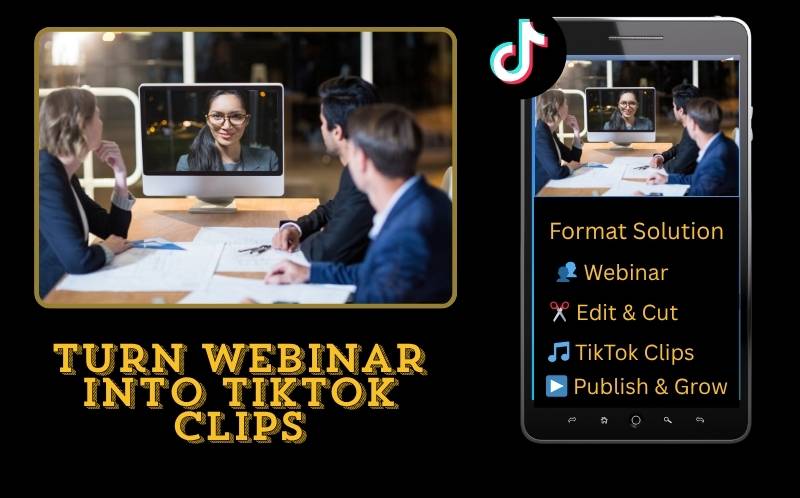
Turn Webinar Into TikTok Clips — Overcoming the Format Challenge
The biggest obstacle when you try to turn webinar into tiktok clips is the visual format. Webinars are recorded in landscape 16:9 with screen share slides, speaker camera feeds, and sometimes multi-speaker panels. TikTok requires 9:16 vertical content. Here is how to solve each scenario:
- Speaker-only moments — When the presenter is on camera without slides, use smart crop to track the speaker and convert to 9:16 vertical automatically. The AI follows facial expressions and gestures frame by frame.
- Slide-heavy sections — When screen share content is the focus, use a stacked layout: the slide occupies the top sixty percent of the 9:16 frame, and the speaker camera fills the bottom forty percent. ReframeX’s split screen creates this layout automatically.
- Slide-heavy sections — When screen share content is the focus, use a stacked layout: the slide occupies the top sixty percent of the 9:16 frame, and the speaker camera fills the bottom forty percent. ReframeX’s split screen creates this layout automatically.
- Multi-speaker panels — For panel discussions, the AI tracks the active speaker and crops to follow them, or uses split screen to show two panelists simultaneously. Either approach lets you turn webinar into tiktok clips from multi-speaker content without manual editing.
- Q&A segments — Audience questions paired with expert answers make excellent clips. Extract the question-answer pair as a standalone thirty to sixty second clip. These drive high engagement because they address real audience pain points.
Each format challenge has an AI-powered solution, making it practical to turn webinar into tiktok clips regardless of your original recording format.
Repurpose Zoom Recording for Instagram Reels - Step by Step
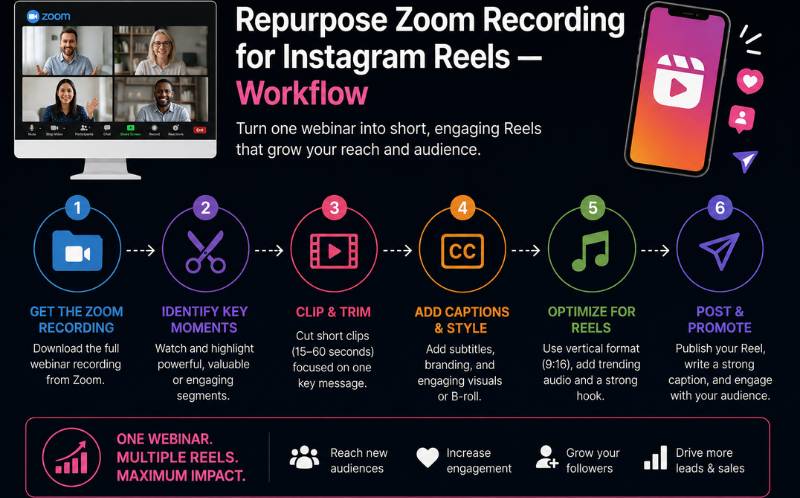
Most webinars happen on Zoom, Teams, or Google Meet. Here is the exact workflow to repurpose zoom recording for instagram reels:
Download your Zoom cloud recording in the highest available resolution. Upload the file to ReframeX . The AI clip generator scans the entire recording and identifies the most engaging moments based on speech energy, visual changes, and conversational dynamics.
Review the AI-suggested clips. For webinars, prioritize moments where the speaker shares a surprising statistic, demonstrates a product feature, or delivers a quotable insight. These are the clips that stop the scroll on Instagram. Select five to ten clips from the suggestions.
The platform automatically reframes each clip to 9:16 vertical, adds AI captions with animated word highlighting, and generates Instagram-optimized metadata. Publish directly or schedule for your content calendar. This is how to repurpose zoom recording for instagram reels in under twenty minutes from a single webinar recording.
Best Tool to Clip Webinar Highlights — Platform Comparison
Choosing the best tool to clip webinar highlights depends on your format complexity and publishing needs. Here is how top options compare:
| Tool | Webinar AI Detection | Screen Share Handling | Split Screen | Captions | Multi-Platform Publish |
|---|---|---|---|---|---|
| ReframeX | Yes — speech + visual | Stacked slide + speaker | Yes — auto | 98%+, 160+ langs | TikTok, IG, YT, LinkedIn |
| OpusClip | Yes — virality score | Basic crop only | No | 90%+, English | TikTok, YouTube |
| Descript | Transcript-based | No special handling | No | 95%+ English | No direct publish |
| Lumen5 | Basic scene detection | Slide-to-video | No | Limited | No direct publish |
| Canva | Manual selection | Manual design | No | Manual add | Instagram only |
For webinar content specifically, the best tool to clip webinar highlights must handle screen share layouts and multi-speaker panels. Reframex is the only platform that combines AI moment detection with intelligent screen share formatting, making it the ideal webinar to short form video converter for B2B marketing teams.
Webinar to Short Form Video Converter — Maximizing Webinar ROI
Using a webinar to short form video converter strategically can multiply your event content value. Follow these expert practices to maximize webinar ROI
- Clip within 24 hours of the live event — Webinar topics are most relevant immediately after the event. Publishing clips quickly capitalizes on audience interest and topic freshness. Use a webinar to short form video converter that processes recordings fast.
- Create a teaser clip for the next webinar — Use the most compelling thirty-second moment from this webinar to promote your next one. This creates a content flywheel where each webinar promotes the next.
- Tag speakers and companies on LinkedIn — When you repurpose zoom recording for instagram reels or LinkedIn posts, tag the speakers. This amplifies reach through their networks and builds relationship equity.
- Add lead capture CTAs — End every clip with a text overlay: "Watch the full webinar — link in bio" or "Register for our next session." This converts social viewers into your lead generation funnel.
- Repurpose across B2B and B2C platforms — LinkedIn and YouTube for professional audiences, TikTok and Reels for broader reach. The best tool to clip webinar highlights lets you format for every platform from one dashboard.
These strategies transform every webinar into weeks of high-performing social content using the right webinar to short form video converter.
Webinar Clip Content Calendar — How to Distribute Clips Over Weeks
Most marketers make the mistake of publishing all their webinar clips in the first day or two after the event. A smarter approach to how to convert webinar recording into social media clips is to build a distribution calendar that extends the webinar’s content life for weeks.
In week one, publish your three strongest highlight clips immediately after the webinar. These are the moments with the highest emotional impact or most surprising data points. Post them to LinkedIn, TikTok, and Instagram within twenty-four hours while the topic is fresh. Tag speakers and use the webinar hashtag to maximize initial reach.
In week two, release your Q&A clips. These work exceptionally well because they address real audience questions, making them highly relevant and searchable. Format each Q&A as a standalone clip with the question as a text overlay in the first frame. The webinar to short form video converter workflow makes this simple — upload the full recording, and the AI detects the question-answer pairs automatically.
In weeks three and four, publish your educational and tutorial clips. These are the deep-dive explanations and demonstrations from the webinar that have evergreen value. They continue driving traffic and leads long after the event because people search for these topics regardless of when the webinar happened.
In week five and beyond, create compilation reels combining the best three to five moments into a sixty-second recap. Use this as a promotional clip for your next webinar, creating a content flywheel where each webinar promotes the next. Schedule this entire calendar in advance using ReframeX’s publishing dashboard so clips publish automatically without daily manual effort.
This structured approach to how to convert webinar recording into social media clips generates four to five weeks of content from a single sixty-minute recording.
Expert Tips for High-Performing Webinar Clips
After learning how to convert webinar recording into social media clips, apply these optimization tactics. Lead with the insight, not the introduction — webinar clips should start with the speaker’s key point, not “Hi everyone, welcome to today’s session.” Cut straight to value. Keep clips between thirty and ninety seconds — shorter for TikTok and Reels, longer for LinkedIn and YouTube.
Add context text overlays in the first frame — a bold question or statistic that explains why viewers should watch. Always include captions because business audiences often watch on mobile during commutes. Cross-post to LinkedIn, TikTok, Instagram, and YouTube using ReframeX’s scheduling tool to maximize distribution from a single processing session.
Frequently Asked Questions
How do I convert webinar recording into social media clips quickly?
Upload your webinar recording to an AI-powered tool like Reframex. The AI identifies the most engaging moments, reframes them for vertical platforms, adds captions, and prepares publish-ready clips. This is how to convert webinar recording into social media clips in under twenty minutes.
Can I turn webinar into tiktok clips from a Zoom recording?
Yes. Download your Zoom recording and upload it to ReframeX. The AI handles the 16:9 to 9:16 conversion using smart crop for speaker-only moments and split screen for slide-heavy sections. You can turn webinar into tiktok clips from any recording platform.
How do I repurpose zoom recording for instagram reels?
Upload the Zoom file to ReframeX, let the AI extract the best clips, review and select, then publish directly to Instagram. The platform handles reframing, captioning, and metadata automatically. This is the fastest way to repurpose zoom recording for instagram reels.
What is the best tool to clip webinar highlights?
The best tool to clip webinar highlights should handle screen share layouts, multi-speaker panels, AI moment detection, and multi-platform publishing. ReframeX is purpose-built for webinar content with stacked slide-plus-speaker formatting and 160+ language caption support.
What is a webinar to short form video converter?
A webinar to short form video converter is an AI tool that transforms long webinar recordings into short, vertical, captioned clips optimized for social media platforms. It automates clipping, reframing, captioning, and publishing to maximize the content value of every webinar.
How many clips can I get from a one-hour webinar?
A typical sixty-minute webinar produces fifteen to twenty clip-worthy moments. After AI extraction and review, most marketers publish ten to fifteen clips per webinar. This volume feeds social media content calendars for two to three weeks from a single recording.
Start Converting Your Webinars Into Social Content
Now that you know how to convert webinar recording into social media clips, try ReframeX free and transform your next webinar into weeks of high-performing content. Get started free – no credit card required.
Trust Element: “4M+ creators | 99.2% accuracy | Free to start”
AUTHOR BIO
Written by the ReframeX Content Team — video production specialists, SEO strategists, and AI technology experts with over fifteen years of combined experience in video content optimization. The team has helped B2B marketers and media organizations process millions of videos across 160+ languages.
Every webinar you host is a content goldmine waiting to be extracted. Learning how to convert webinar recording into social media clips ensures that investment keeps generating value long after the live event ends.




