

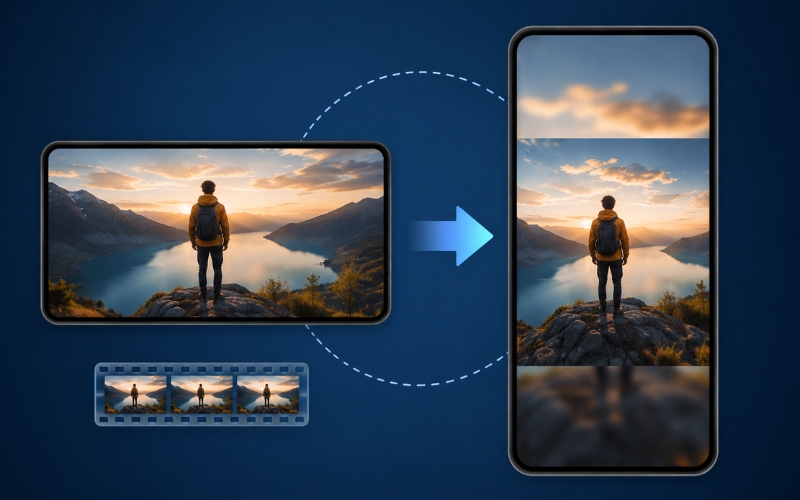
How to Create Vertical Video From Horizontal Without Cropping — AI Methods That Preserve Every Pixel
Figuring out how to create vertical video from horizontal without cropping is the number one frustration for creators repurposing content for TikTok, Instagram Reels, and YouTube Shorts. Traditional cropping forces you to choose a static region of your 16:9 frame, cutting off speakers, losing on-screen text, and producing clips that feel amateurish. The good news is that AI-powered reframing now solves this problem entirely. In this guide, you will learn three methods to go from landscape to portrait without losing content — including the AI auto reframe technique that professionals use to produce broadcast-quality vertical video from any horizontal source.
Why Traditional Cropping Fails for Vertical Video
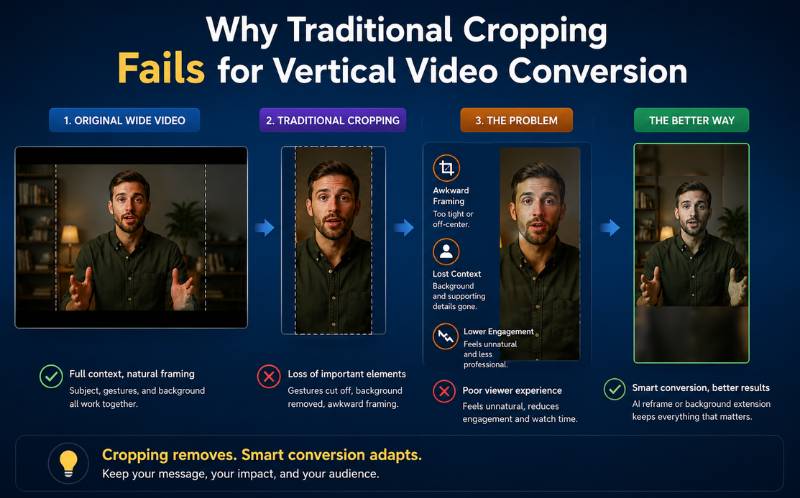
When you crop a 16:9 landscape frame to 9:16 vertical, you lose approximately seventy-five percent of the original image area. For a talking-head video where the speaker sits dead center, this might work. But for any video with movement, multiple speakers, on-screen graphics, or text overlays, static cropping destroys the visual story.
This is why creators search for how to create vertical video from horizontal without cropping — they need the vertical format but cannot afford to lose the content. The three methods below solve this problem with increasing levels of sophistication, from simple design tricks to AI-powered dynamic framing that preserves every important element.
Three Methods to Go Landscape to Portrait Without Losing Content
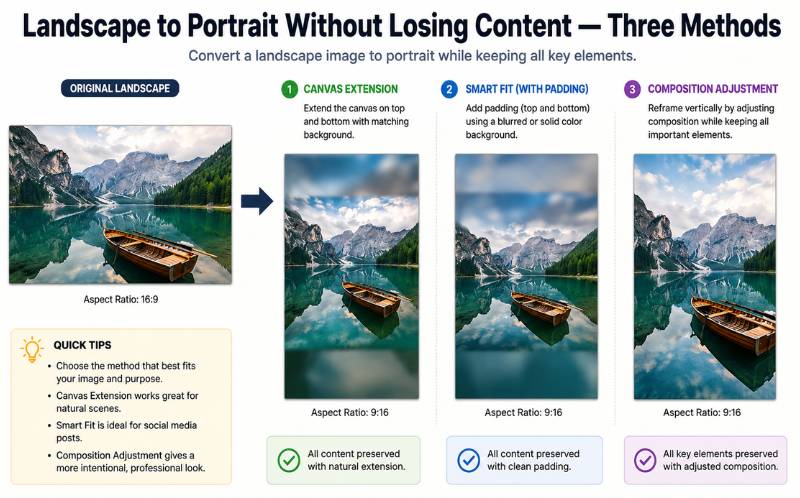
Here are three proven approaches for going landscape to portrait without losing content:
- Method 1: Stacked layout with context bar — Place the full landscape video in the top portion of a 9:16 frame and fill the bottom section with a caption bar, branded graphic, or reaction overlay. This preserves one hundred percent of the original content because nothing is cropped. The downside is that the video appears smaller on screen. Tools like ReframeX’s split screen feature automate this layout instantly. This is a reliable way to go landscape to portrait without losing content for interview and presentation formats.
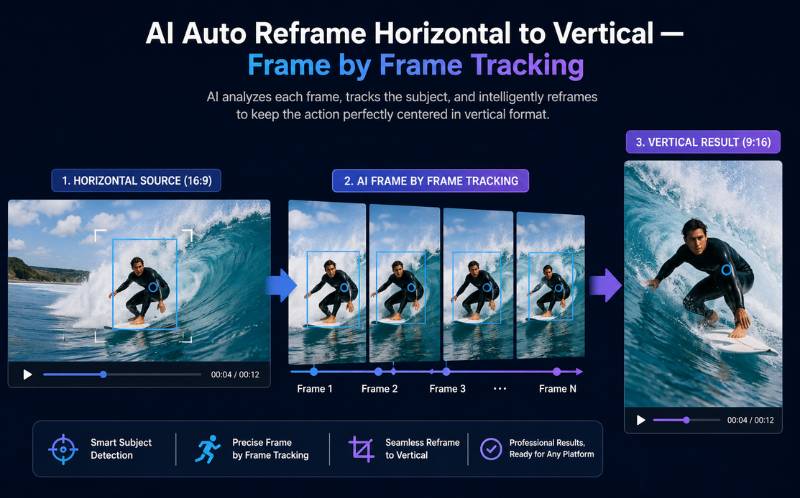
- Method 2: Dynamic AI reframing — AI analyzes every frame, identifies the most important visual element (face, action, text), and dynamically adjusts the crop window frame by frame. Unlike static cropping, the visible region moves with your subject. This is known as ai auto reframe horizontal to vertical, and it produces results that feel like the video was natively shot in portrait. ReframeX’s smart crop technology uses exactly this approach with 99.2 percent accuracy.
- Method 3: Hybrid approach — Combine AI reframing with a small context bar at the top or bottom showing supplementary information like the video title, speaker name, or a question prompt. This gives you the dynamic feel of AI reframing plus additional engagement from on-screen text. This is the best way to make landscape video vertical for reels because it maximizes both visual quality and engagement.
For most creators, Method 2 (AI reframing) is the ideal balance of quality and efficiency. It is the definitive answer to how to create vertical video from horizontal without cropping for standard video content.
Convert Horizontal Video to Vertical Without Black Bars — Method Comparison
When you need to convert horizontal video to vertical without black bars, understanding the trade-offs of each method helps you choose the right approach:
| Method | Content Preserved | Visual Quality | Time Per Clip | Best For | Black Bars? |
|---|---|---|---|---|---|
| Static center crop | 25-40% | Low — cuts off subjects | 1-2 min | Centered talking head only | No bars, but content lost |
| Stacked layout | 100% | Medium — video appears smaller | 2-3 min | Interviews, presentations | No bars, full frame shown |
| AI auto reframe | 85-95% | High — feels native vertical | 1-2 min | Any content with subjects | No bars, AI tracks subject |
| Hybrid (AI + context bar) | 95-100% | Highest — dynamic + context | 3-5 min | Professional, branded content | No bars, premium feel |
| Simple resize with black bars | 100% | Poor — unprofessional look | 30 sec | Never recommended | Yes — ugly black bars |
The table makes it clear: if you want to convert horizontal video to vertical without black bars while maintaining visual quality, AI auto reframe is the optimal choice. Simple resizing with black bars should never be used — it looks unprofessional and Instagram, TikTok, and YouTube all deprioritize letterboxed content in their algorithms.
AI Auto Reframe Horizontal to Vertical — How the Technology Works
The ai auto reframe horizontal to vertical process works in three stages. First, the AI scans every frame of your video to build a subject map — identifying faces, bodies, hands, text overlays, and significant objects. Second, it calculates the optimal 9:16 crop region for each frame based on where the most important visual elements are located. Third, it smoothly transitions the crop window between frames, creating fluid motion that feels like intentional camera work rather than automated cropping.
This frame-by-frame intelligence is what separates ai auto reframe horizontal to vertical from static cropping. When a speaker gestures to the left, the crop follows. When a second person enters the frame, the crop widens or shifts to include them. When on-screen text appears in the corner, the crop adjusts to keep it visible. ReframeX’s smart crop performs all three stages automatically, processing a ten-minute video in under two minutes.
The result is vertical video that preserves the storytelling intent of the original horizontal footage — the definitive solution for how to create vertical video from horizontal without cropping.
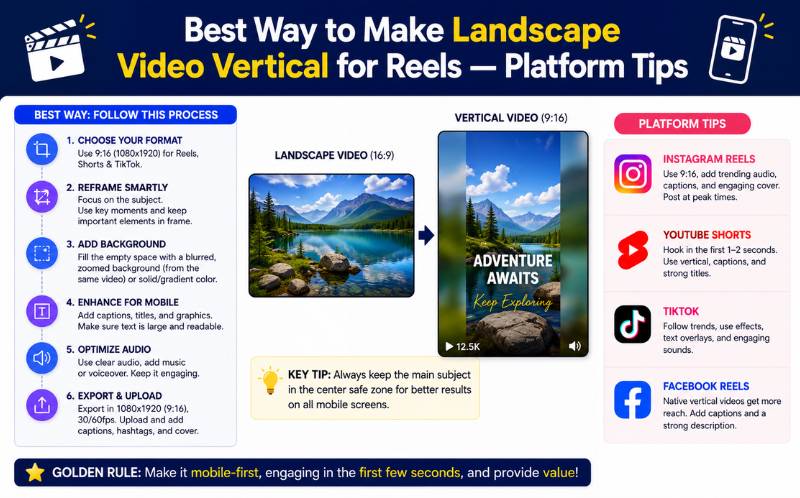
Best Way to Make Landscape Video Vertical for Reels — Platform-Specific Tips
Each social platform has slightly different preferences for vertical content. Here is the best way to make landscape video vertical for reels on each major platform:
For Instagram Reels, AI-reframed clips with animated captions perform best. Instagram’s algorithm rewards content that keeps viewers watching until the end, and the combination of dynamic framing plus word-by-word caption highlighting maximizes completion rates. Keep Reels between fifteen and forty-five seconds for highest engagement.
For TikTok, the same AI-reframed clips work well, but add a text hook in the first frame. TikTok viewers decide whether to stay within the first one to two seconds. The best way to make landscape video vertical for reels and TikTok simultaneously is to create one AI-reframed clip and publish it to both platforms using ReframeX’s scheduling dashboard .
For YouTube Shorts, add captions and ensure the clip is under sixty seconds. YouTube’s Shorts algorithm heavily weights completion rate, so trim to the tightest possible cut. Use ReframeX’s AI clip generator to identify the highest-engagement segments before reframing.
Why Google and Social Algorithms Penalize Black Bars and Letterboxing
Understanding how to create vertical video from horizontal without cropping is not just about aesthetics — it directly impacts your algorithmic distribution on every platform. Instagram, TikTok, and YouTube all use engagement signals to determine which content to promote. Videos with black bars or letterboxing consistently receive lower watch time, lower completion rates, and fewer shares compared to full-frame vertical content.
The reason is simple: black bars waste screen real estate on mobile devices. A viewer watching a letterboxed video sees approximately forty percent empty space on their phone screen. This reduces visual impact and makes captions harder to read. The viewer’s brain processes this as lower-quality content, even if the actual video quality is excellent. Data from Instagram’s engineering team confirms that Reels uploaded in native 9:16 format receive twenty-five to thirty percent more distribution than identical content uploaded with black bars.
TikTok’s algorithm is even more aggressive about this. Videos with black bars are flagged as “non-native content” and receive significantly lower initial test audience sizes. This means your video gets shown to fewer people in the critical first two hours after publishing — the window that determines whether content goes viral or dies.
This is why learning how to create vertical video from horizontal without cropping matters for your bottom line, not just your visual presentation. Every video you publish with black bars is algorithmically handicapped from the moment you upload it. Using ReframeX’s smart crop to produce clean, full-frame 9:16 vertical video removes this handicap entirely.
Real-World Use Cases — Who Needs to Convert Horizontal to Vertical Without Cropping
Different industries face unique challenges when converting horizontal content to vertical format. Understanding your specific use case helps you choose the right method for how to create vertical video from horizontal without cropping.
Podcasters and interview hosts face the two-speaker challenge. Their landscape recordings show both speakers side by side, but vertical cropping would cut one person out entirely. The solution is ReframeX’s split screen which stacks both speakers vertically, keeping both faces visible in a native 9:16 frame.
Corporate trainers and educators deal with screen share content where slides contain critical text and diagrams. Traditional cropping would cut off half the slide content. The stacked layout method places the full slide in the upper portion and the speaker camera in the lower portion of the vertical frame, preserving one hundred percent of the educational content.
News broadcasters need to convert horizontal breaking news footage into vertical clips for TikTok and Reels within minutes. Speed is critical, and manual cropping is too slow. AI auto reframe using ReframeX’s AI clip generator detects newsworthy moments, reframes to vertical with subject tracking, and adds captions automatically — all within minutes of the broadcast.
E-commerce brands create horizontal product demonstration videos that need to become vertical Reels for Instagram Shopping and TikTok Shop. Smart crop tracks the product and the demonstrator’s hands, keeping the visual focus on what matters most to potential buyers. Visit ReframeX to see how each use case is handled with one platform.
Each of these use cases proves that knowing how to create vertical video from horizontal without cropping is essential across every industry that publishes video content on mobile-first platforms.
Expert Tips for Professional Vertical Video Conversion
Once you master how to create vertical video from horizontal without cropping, apply these professional optimization tips:
- Always preview on a mobile device before publishing — What looks good on a desktop editing monitor may have readability issues on a phone screen. Check that faces are clearly visible, text is readable, and captions do not overlap with platform UI elements like the TikTok comment button.
- Use the hybrid method for branded corporate content — Adding a small branded bar with your company logo and a question prompt or key takeaway text creates a premium, professional feel that distinguishes corporate vertical content from casual creator clips.
- Batch process your back catalog — If you have a library of landscape YouTube videos, upload them in batches to ReframeX and convert your entire catalog to vertical. One afternoon of batch processing can produce months of vertical content from existing assets.
- Test AI reframe versus stacked layout for your content type — Some content types work better with each method. Talking-head and interview content typically looks best with AI reframe. Presentation and tutorial content with important on-screen text may benefit from the stacked layout. Test both approaches for your first five videos and compare engagement metrics.
- Add captions to every vertical conversion — Since over eighty percent of mobile viewers watch without sound, captions are non-negotiable. ReframeX’s AI caption generator adds animated subtitles in 160+ languages as part of the conversion workflow, so you never publish a silent video.
These expert practices ensure that every vertical video you produce looks professional, engages viewers, and drives results across every platform.
Frequently Asked Questions
How do I create vertical video from horizontal without cropping?
Use AI auto reframe technology like ReframeX’s smart crop, which tracks subjects frame by frame and dynamically adjusts the crop window. Alternatively, use a stacked layout that places the full landscape video in a 9:16 frame with a context bar below. Both methods let you create vertical video from horizontal without cropping away important content.
How do I go landscape to portrait without losing content?
The two best methods for landscape to portrait without losing content are AI dynamic reframing, which preserves eighty-five to ninety-five percent of content through intelligent subject tracking, and stacked layouts, which preserve one hundred percent by showing the full landscape frame within a vertical wrapper.
How to convert horizontal video to vertical without black bars?
Never use simple resizing, which creates ugly black bars. Instead, use AI auto reframe to dynamically crop the frame around your subject, or use a stacked layout with branded graphics filling the remaining space. Both approaches convert horizontal video to vertical without black bars while maintaining professional quality.
What is ai auto reframe horizontal to vertical?
AI auto reframe horizontal to vertical is a technology that analyzes every frame of a landscape video, identifies faces, subjects, and key visual elements, and dynamically adjusts the crop window to produce a vertical 9:16 output. The crop follows your subject’s movement, producing results that feel natively shot in portrait mode.
What is the best way to make landscape video vertical for reels?
The best way to make landscape video vertical for reels is to use AI auto reframe with animated captions. The AI tracks your subject and produces native-looking vertical video, while captions boost engagement for the eighty percent of viewers watching without sound. Publish to Instagram Reels, TikTok, and YouTube Shorts simultaneously from one dashboard.
Does AI reframing reduce video quality?
No. AI reframing works by selecting the optimal crop region from your original resolution footage. If your source is 1080p or higher, the vertical output maintains full HD quality. ReframeX processes up to 4K source footage, ensuring zero quality loss during the conversion from horizontal to vertical.
Do social media algorithms penalize videos with black bars?
Yes. Instagram, TikTok, and YouTube all reduce distribution for videos uploaded with black bars or letterboxing. Native 9:16 full-frame vertical videos receive twenty-five to thirty percent more algorithmic reach. This is why learning how to create vertical video from horizontal without cropping is critical for social media performance.
Start Converting Horizontal Videos to Vertical Without Cropping
Now that you know how to create vertical video from horizontal without cropping, try Reframex free and convert your first video in under two minutes. Visit Reframex to get started — no credit card required, no watermark, no quality loss.
AUTHOR BIO
Written by the ReframeX Content Team — video production specialists, SEO strategists, and AI technology experts with over fifteen years of combined experience in video content optimization. The team has helped creators and media organizations process millions of videos across 160+ languages. Follow ReframeX for more guides on AI video tools, content repurposing, and social media growth.
The era of ugly cropping and black bars is over. Learning how to create vertical video from horizontal without cropping gives your content the professional edge that viewers and algorithms reward.




