

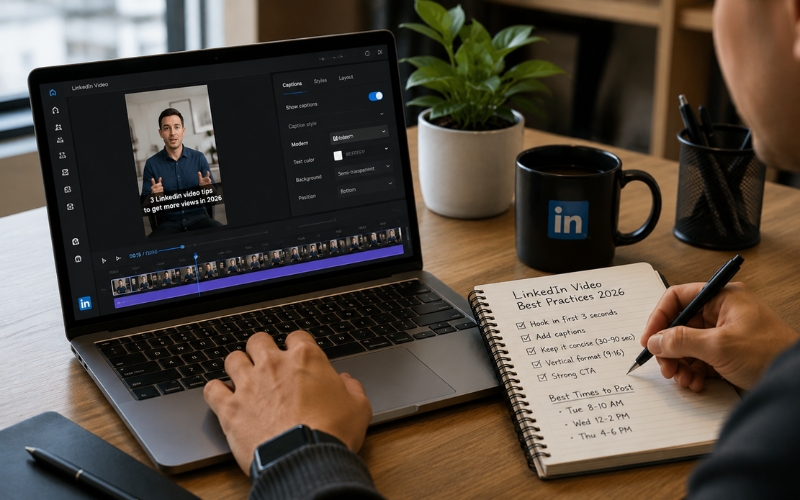
How to Create LinkedIn Video Content That Gets Views .The 2026 Playbook
Understanding how to create linkedin video content that gets views is the most underrated growth strategy for professionals and B2B brands in 2026. LinkedIn’s algorithm prioritizes video over every other content format. Video posts receive five times more engagement and twenty times more shares than text-only updates. Yet only fourteen percent of LinkedIn users publish video content regularly. This gap is your opportunity.
Why LinkedIn Video Outperforms Every Other Format in 2026
LinkedIn’s feed algorithm gives video posts a significant distribution advantage. The platform wants to keep users watching, and video achieves that better than text or images. A well-optimized LinkedIn video reaches three to ten times more people than a text post from the same account.
The professional context makes LinkedIn video uniquely valuable. Viewers on LinkedIn are decision-makers, hiring managers, and industry leaders. A video that reaches five thousand LinkedIn viewers often delivers more business impact than fifty thousand views on TikTok. Learning how to create linkedin video content that gets views is not just a vanity metric strategy — it is a lead generation and brand authority strategy.
LinkedIn video best practices 2026 have also shifted. The platform now supports vertical video natively and has launched its own short-form video feed. Creators who adapt to these changes early capture the majority of organic reach before the market saturates.
H2: What Is the Best Video Format for LinkedIn in 2026?
The best video format for LinkedIn depends on where your video appears in the feed. Here are the format specs that drive maximum engagement:
| Format | Dimensions | Length | Autoplay? | Best For |
|---|---|---|---|---|
| Vertical (9:16) | 1080 × 1920 | 30–90 seconds | Yes, muted | Short-form feed + LinkedIn’s new video tab |
| Square (1:1) | 1080 × 1080 | 60–120 seconds | Yes, muted | Feed posts + article embeds |
| Landscape (16:9) | 1920 × 1080 | 2–5 minutes | Yes, muted | Interviews, webinar clips, tutorials |
| Vertical Story | 1080 × 1920 | 15–30 seconds | Yes, muted | LinkedIn Stories, limited availability |
“
For maximum reach, vertical 9:16 is now the best video format for linkedin because LinkedIn has launched its own short-form vertical feed. Creators who post vertical video appear in both the regular feed and the dedicated video tab, doubling their distribution surface. Use ReframeX’s smart crop (https://www.reframex.ai/smart-crop/) to convert any landscape video to vertical format with AI subject tracking.
LinkedIn Video Best Practices 2026 — Seven Rules That Drive Views?
Follow these linkedin video best practices 2026 to maximize every post:
- Always add captions — LinkedIn videos autoplay muted. Without captions, viewers scroll past. Use ReframeX’s AI caption generator (https://www.reframex.ai/ai-caption-generator/) for animated word-by-word subtitles in 160+ languages.
- Hook in the first three seconds — Open with a bold statement, surprising statistic, or direct question. LinkedIn users decide to watch or scroll within three seconds. Lead with value, not an introduction.
- Keep shorts under ninety seconds — LinkedIn’s algorithm rewards completion rate. Shorter videos achieve higher completion. For long-form content, stay under five minutes.
- Post natively, never as a link — Never share a YouTube link on LinkedIn. Upload the video directly. LinkedIn aggressively deprioritizes external links. Native uploads get ten times more reach.
- Include a text post with the video — Write three to five lines of context above the video. Use the first line as a second hook. Tag relevant people or companies for additional distribution.
- Post between Tuesday and Thursday, 7-9 AM — LinkedIn engagement peaks during business mornings. Schedule posts using ReframeX’s scheduling dashboard (https://www.reframex.ai/social-media-scheduling/) to hit optimal windows
- Engage in comments within thirty minutes — LinkedIn’s algorithm evaluates early engagement velocity. Responding to comments in the first thirty minutes signals active content and boosts distribution.
These linkedin video best practices 2026 apply to every content type — talking head, interviews, tutorials, and repurposed clips.
How Do You Repurpose YouTube Videos for LinkedIn Posts?
The fastest way to create linkedin video content that gets views is to repurpose what you already have. Here is how to repurpose youtube videos for linkedin posts in four steps:
- Step 1: Select your best-performing YouTube videos. Check YouTube Analytics for videos with the highest engagement rate, not just views. High engagement indicates content that resonates — perfect for LinkedIn’s professional audience.
- Step 2: Extract the strongest sixty to ninety second segment. Use ReframeX’s AI clip generator (https://www.reframex.ai/ai-video-clip-generator/) to identify the most engaging moments automatically. The AI scores each potential clip for predicted engagement.
- Step 3: Reformat for LinkedIn. Convert the landscape YouTube clip to vertical 9:16 using smart crop (https://www.reframex.ai/smart-crop/) or keep it in 16:9 landscape for LinkedIn’s traditional feed. Add captions — this is non-negotiable for LinkedIn.
- Step 4: Upload natively to LinkedIn with context. Write a three to five line text post above the video. Include a hook, the key insight, and a question to drive comments. This is how to repurpose youtube videos for linkedin posts effectively.
Five Types of LinkedIn Video That Drive the Most Views
After understanding how to create linkedin video content that gets views, focus on these five content types that perform best:
- Industry insights and hot takes — Share your professional opinion on trending topics. These drive the highest comment engagement because they invite debate. Keep them under sixty seconds.
- Behind-the-scenes content — Show your work process, office culture, or project development. Authenticity outperforms polish on LinkedIn. Shoot casually on your phone.
- Quick tutorials and how-to clips — Teach one specific skill in ninety seconds or less. Screen recordings with voiceover work perfectly. The best free tool to create professional linkedin videos for tutorials is a screen recorder plus ReframeX for captions.
- Client testimonials and case studies — Short video testimonials from clients build trust faster than written case studies. Film a thirty-second quote from a satisfied client and add captions for silent viewing.
- Repurposed podcast and webinar clips — Extract the best moments from long-form content. This is the highest-ROI approach because the content already exists. The best free tool to create professional linkedin videos from existing content is ReframeX’s combination of clip extraction, smart crop, and caption generation.
Rotating between these five types keeps your LinkedIn feed fresh and serves different audience segments.
Why LinkedIn Video Outperforms Every Other Format in 2026
Build a personal brand through consistency. Post video three to five times per week. LinkedIn rewards consistent creators with increasing reach over time. Batch-produce content in one session and schedule it across the week.
Optimize your profile for video discovery. Add “Video Content” or your niche topic to your LinkedIn headline. When your videos appear in the feed, your headline acts as a trust signal that encourages clicks. Use ReframeX’s multi-platform publishing (https://www.reframex.ai/social-media-publishing/) to cross-post LinkedIn videos to TikTok and Instagram Reels simultaneously, maximizing reach from every production session.
Frequently Asked Questions
What type of video performs best on LinkedIn?
Industry insights, quick tutorials, behind-the-scenes content, client testimonials, and repurposed podcast clips perform best. Keep videos under ninety seconds with captions. This is how to create linkedin video content that gets views consistently.
How do I create video content for LinkedIn?
Either create original content (talking head, screen recordings) or repurpose existing YouTube and podcast content. Add captions, format for vertical or square, and upload natively. Never share YouTube links — native uploads get ten times more reach.
What is the best video format and length for LinkedIn?
Vertical 9:16 at thirty to ninety seconds is now the best video format for linkedin. Square 1:1 also works well. LinkedIn’s new short-form video feed prioritizes vertical content. Always add captions for muted autoplay.
How to repurpose YouTube videos for LinkedIn posts?
Extract the best sixty to ninety second segment using AI clip detection. Convert to vertical format with smart crop. Add captions. Upload natively to LinkedIn with a text hook above the video. This is how to repurpose youtube videos for linkedin posts effectively.
What is the best free tool to create professional LinkedIn videos?
ReframeX is the best free tool to create professional linkedin videos from existing content. It extracts clips, converts to vertical, adds animated captions, and schedules publishing. Free tier with no watermarks.
How often should I post video on LinkedIn?
Post three to five videos per week for optimal algorithm performance. Consistency matters more than production quality on LinkedIn. Batch-produce content and schedule posts during peak engagement windows.
TESTIMONIAL
“LinkedIn is the last major platform where organic video reach is still exploding. The window of opportunity is right now — before every professional figures out that video outperforms text by five to one. Early movers on LinkedIn video will own their niche for years.”
— ReframeX Team, powered by Videograph.ai (a YuppTV company)
Start Creating Faceless YouTube Shorts Today
Now that you know how to create faceless youtube shorts with ai, try ReframeX free for vertical formatting, animated captions, and multi-platform publishing. Visit Reframex to get started – no credit card, no watermark.

Author Bio
Written by the ReframeX Content Team – video production specialists, SEO strategists, and AI technology experts with over fifteen years of combined experience in video content optimization. The team has helped creators and media organizations process millions of videos across 160+ languages.




