

How to Make a Video Montage for Instagram and TikTok Free AI Guide
Understanding how to make a video montage for instagram and tiktok is one of the most valuable content skills you can develop in 2026. Montage videos compilations of your best moments set to trending music consistently outperform single-topic content on both platforms. They are shareable, rewatchable, and algorithmically favored because they drive high completion rates and replay. This guide shows you the exact workflow to create highlight reel from multiple clips using AI tools.
Why Montage Videos Are the Highest-Engagement Format on Social Media
Montage videos succeed because they pack maximum value into minimum time. Each clip delivers a separate moment of impact. Viewers stay engaged because the visual variety prevents attention fatigue. The rapid transitions create a dopamine feedback loop that keeps people watching and rewatching.
Data from Instagram shows that Reels with multiple scene changes achieve forty percent higher completion rates than single-shot videos. TikTok’s algorithm rewards replay rate, and montages are the most replayed format because viewers want to catch details they missed on first watch.
For creators, montages are also the most efficient content format. Instead of creating something new, you compile your best existing moments. Learning how to make a video montage for instagram and tiktok turns your content archive into your highest-performing new content.
How Do You Create a Highlight Reel From Multiple Clips?
Here is the step-by-step process to create highlight reel from multiple clips:
- Step 1: Gather your source material Pull your best-performing videos from the past month. Focus on moments with high views, saves, or shares. You can also include behind-the-scenes footage, funny moments, and emotional highlights that were never published.
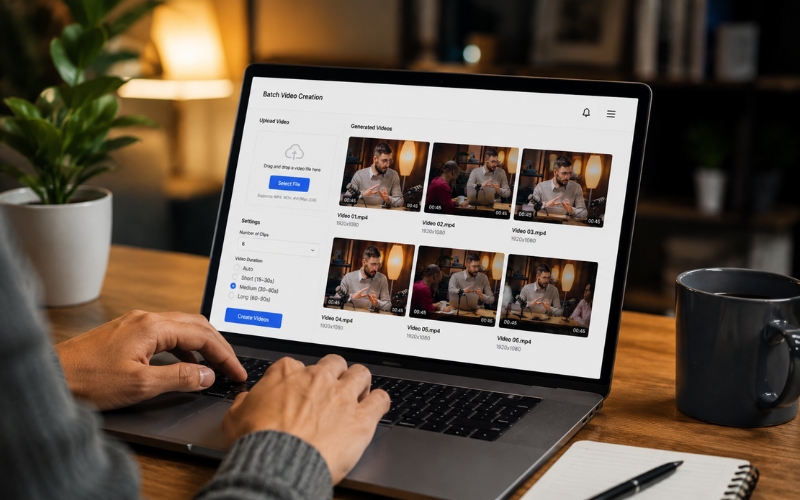
- Step 2: Use AI to identify the best moments Upload your source videos to ReframeX’s AI clip generator (https://www.reframex.ai/ai-video-clip-generator/). The AI scores each moment for engagement potential, saving you hours of manual scrubbing. Select the top five to ten moments.
- Step 3: Trim each clip to three to five seconds Montages work best when each clip is extremely short. Use ReframeX’s video trimmer (https://www.reframex.ai/ai-video-trimmer-online/) for precise cuts. Each clip should show one impactful moment or reaction.
- Step 4: Arrange and add music Order clips for maximum emotional flow. Start strong, build intensity in the middle, and end with your best moment. Sync transitions to the beat of your chosen trending audio. This is the key to making montages feel professional.
- Step 5: Add captions and publish Add animated captions using ReframeX’s caption generator (https://www.reframex.ai/ai-caption-generator/) for viewers watching without sound. Publish to Instagram Reels and TikTok using the scheduling dashboard (https://www.reframex.ai/social-media-scheduling/).
This five-step process is how to compile best video moments into one montage for reels that drives maximum engagement.
Video Montage Maker for Social Media Tool Comparison
Here are the top video montage maker or social media tools compared:
| Tool | AI Moment Detection | Multi-Clip Assembly | Vertical 9:16 | Captions | Free Tier |
|---|---|---|---|---|---|
| ReframeX | Yes, engagement scoring | Yes, smart crop | Auto conversion | 160+ languages, animated | Free, no watermark |
| CapCut | No, manual selection | Yes, timeline editor | Template-based | 20+ languages, basic | Free with watermark |
| InShot | No, manual | Yes, mobile editor | Manual resize | Basic overlay | Free with ads |
| VN Video Editor | No, manual | Yes, advanced timeline | Manual resize | No built-in | Free, no watermark |
| Canva Video | No, manual | Yes, drag and drop | Template-based | Basic overlay | Free tier available |
“`
ReframeX is the only video montage maker for social media with AI moment detection. Other tools require you to manually select moments. ReframeX identifies your best clips automatically, saving hours per montage. This makes it the best free tool to make video compilations for tiktok at scale.
How Do You Start a Faceless YouTube Channel With AI in 2026?
When choosing the best free tool to make video compilations for tiktok, prioritize three capabilities: AI moment detection to find your best clips automatically, vertical formatting to ensure 9:16 output, and caption generation for silent viewers.
ReframeX combines all three. Upload your source videos, let the AI identify highlights, trim and arrange them, add animated captions, and publish directly to TikTok. The entire workflow happens in one platform without downloading or re-uploading files.
For creators who want to learn how to make a video montage for instagram and tiktok efficiently, having AI handle the moment selection is the critical differentiator. Manual selection from hours of footage takes forever. AI narrows it to the top moments in minutes.
Expert Tips for Montage Videos That Go Viral
After mastering how to make a video montage for instagram and tiktok, apply these viral optimization techniques:
- Use trending audio Browse TikTok’s trending sounds library and Instagram’s Reels music picker. Montages synced to trending audio receive algorithmic boosts on both platforms.
- Sync cuts to the beat Every clip transition should land on a musical beat or drop. Beat-synced montages feel professional and satisfying. This is the single biggest quality differentiator between amateur and viral montages.
- Keep total length under forty-five seconds Short montages achieve higher completion rates. Five to ten clips at three to five seconds each produces a thirty to fifty second montage the sweet spot for both platforms.
- Include a text hook in the first frame Add a bold text overlay like "My best moments this month" or "POV: when everything clicks." This gives viewers context and a reason to watch.
- Create monthly recap montages Publish one montage per month compiling your best content. This creates an ongoing series that followers anticipate. It also serves as a portfolio piece for new viewers discovering your profile.
These expert techniques transform basic compilations into scroll-stopping montages. Understanding how to compile best video moments into one montage for reels with these optimizations is what separates viral montages from forgettable ones.

Frequently Asked Questions
How do I make a video montage for Instagram Reels?
Select five to ten best moments from your existing content. Trim each to three to five seconds. Arrange them with transitions synced to trending music. Add captions and publish. This is how to make a video montage for instagram and tiktok in under thirty minutes.
What is the best tool to create highlight montage videos?
ReframeX is the best video montage maker for social media because it uses AI to identify your strongest moments automatically. Other tools require manual selection. ReframeX also handles vertical formatting and animated captions in one platform.
How to combine multiple clips into one montage for TikTok?
Upload your source videos to an AI clipping tool. Select the top moments. Trim each to three to five seconds. Arrange them with beat-synced transitions. Add music, captions, and publish. The best free tool to make video compilations for tiktok handles this entire workflow.
How many clips should a montage have?
Five to ten clips is the sweet spot. Each clip should be three to five seconds. This produces a thirty to fifty second montage which achieves the highest completion rates on Instagram Reels and TikTok.
How to compile best video moments into one montage for reels?
Use AI moment detection to score your existing content for engagement potential. Select the top-scoring moments. Trim, arrange with music, add animated captions, and publish. This is how to compile best video moments into one montage for reels efficiently.
Do montage videos perform better than regular posts?
Yes. Montages achieve forty percent higher completion rates and significantly more replays than single-shot videos. They are the highest-engagement format on Instagram Reels and TikTok because rapid scene changes maintain viewer attention throughout.
TESTIMONIAL
“A montage is not just a compilation it is a highlight reel of your best work. Every creator should build the habit of saving their strongest moments and compiling them monthly. This single content format drives more profile visits than any other.”
Fitness Content Creator, Instagram and TikTok
– ReframeX Team, powered by Videograph.ai (a YuppTV company)
Start Creating Video Montages That Go Viral
Now that you know how to make a video montage for instagram and tiktok, try ReframeX free for AI moment detection, clip trimming, captions, and publishing. Visit https://www.reframex.ai/ no credit card, no watermark.

Suman
Written by the ReframeX Content Team, video production specialists, SEO strategists, and AI technology experts with over fifteen years of combined experience in video content optimization. The team has helped creators and media organizations process millions of videos across 160+ languages.




